
ODP vs PPTX: What’s the Difference and Which Should You Use?
Last updated on June 11th, 2026

You exported a presentation and got a file ending in .odp, but the person you’re sending it to expects a .pptx. Or it’s the other way around: someone emailed you an .odp and PowerPoint is giving you grief. Both files hold slides, so what’s the actual difference, and does it matter?
It comes down to two ecosystems. PPTX is Microsoft PowerPoint’s format. ODP is the open-source equivalent, used by LibreOffice, OpenOffice, and Google Slides. Most apps open both, so the real questions are how they differ under the hood and what you lose when you convert. Here’s the full picture.
Key Takeaways
- PPTX is PowerPoint’s format (Office Open XML, ISO/IEC 29500); ODP is the open OpenDocument format (ISO/IEC 26300) used by LibreOffice, OpenOffice, and Google Slides.
- They’re more alike than they look: both are ZIP-packaged XML files, and most apps open either one.
- PowerPoint can open and save .odp, but converting drops animations, themes, SmartArt, and macros, so save a
.pptxcopy first. - Use PPTX in the Microsoft world or when fidelity matters; use ODP for open-source, cross-platform, or archival work.
ODP vs PPTX at a glance
The short version: PPTX and ODP are more alike than they look. Both are ZIP-packaged XML files that nearly every presentation app can open. The real difference is ecosystem and fidelity. PPTX is built for Microsoft PowerPoint, ODP for open-source tools, and converting between them can cost you animations and formatting.
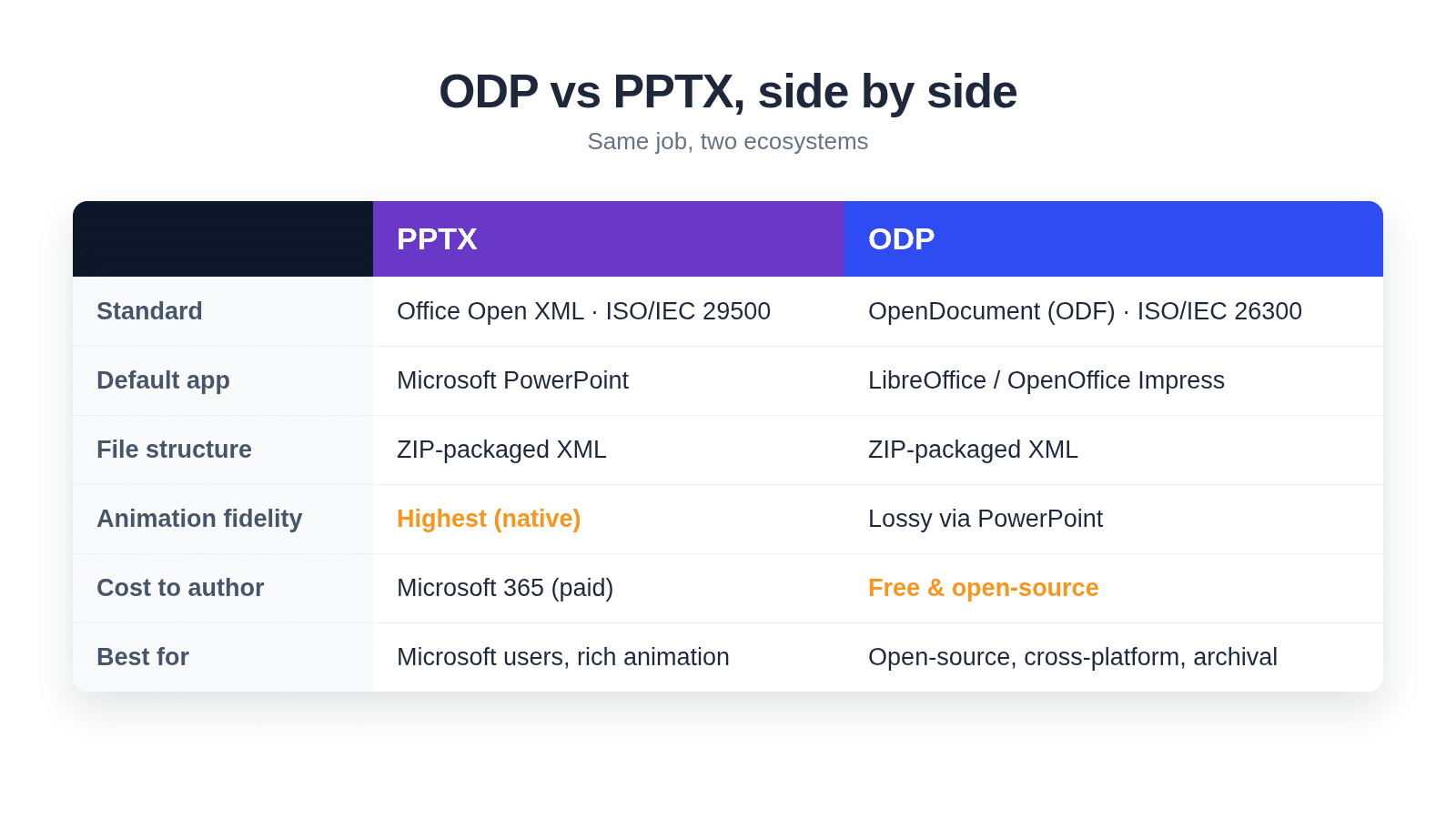
| PPTX | ODP | |
|---|---|---|
| Full name | Office Open XML Presentation | OpenDocument Presentation |
| Standard | ECMA-376 / ISO/IEC 29500 | OASIS ODF / ISO/IEC 26300 |
| Default app | Microsoft PowerPoint (2007+) | LibreOffice / OpenOffice Impress |
| Also opens in | Google Slides, Keynote, LibreOffice | PowerPoint (2010+), Google Slides, Keynote |
| File structure | ZIP-packaged XML | ZIP-packaged XML |
| Animation fidelity | Highest (native PowerPoint) | Lossy when round-tripped through PowerPoint |
| Cost to author | Microsoft 365 / PowerPoint (paid) | Free, open-source |
| Best for | Microsoft users, rich animations | Open-source, cross-platform, archival |
If you’re really asking “what’s the difference between PPT and PPTX?”, that’s a separate question. See our guide on the difference between PPT and PPTX file formats for that one.
What is a PPTX file?
A PPTX file is the presentation format Microsoft PowerPoint has used by default since 2007. It’s built on Office Open XML (ISO/IEC 29500), and despite looking like a single document, it’s actually a ZIP archive packed with XML files, images, and fonts.
PPTX replaced the older binary .ppt format, trading a closed structure for open, inspectable XML. That switch is why so many tools can read it today: PowerPoint, of course, but also Google Slides, Apple Keynote, and LibreOffice. If you want to see how the parts fit together, SlideModel has a good teardown of the anatomy of a .pptx file.
For most people, the practical takeaway is simple. PPTX is the business and education default. If you’re sharing a deck and don’t know what the other side uses, PPTX is the safe bet.
What is an ODP file?
An ODP file is an OpenDocument Presentation, the open-source counterpart to PPTX. It’s part of the OpenDocument Format (ODF), a vendor-neutral standard maintained by OASIS and published as ISO/IEC 26300. It’s the default save format for LibreOffice Impress and Apache OpenOffice Impress.
Here’s the part that surprises people: ODP is built the same way as PPTX. It’s also a ZIP-compressed bundle of XML. The two formats are cousins, not opposites. The difference is who stewards them and which apps treat them as “home.”
Because ODF is a free, open standard, ODP shows up a lot in open-source workflows and in public-sector or archival settings where an open format is required. Google Slides imports and exports it too, so it’s far from a niche format.
Can you open ODP in PowerPoint (and PPTX in LibreOffice)?
Yes, in both directions. As of 2026, PowerPoint can open and save .odp files, a capability Microsoft added back in the 2010 version (Microsoft Support). LibreOffice and OpenOffice Impress open and save .pptx just as happily.
So at the “will it open” level, the two formats are interchangeable. You can hand an .odp to a PowerPoint user or a .pptx to a LibreOffice user, and the file will open.
The catch is that “opens” and “opens perfectly” aren’t the same thing. The moment you convert a complex deck from one format to the other, some things can shift or disappear. To go deeper on the open-source side, see our walkthrough on how to open PowerPoint files in OpenOffice Impress.
What you lose when you convert between ODP and PPTX
This is the part most guides skip, and it’s the one that bites you mid-presentation. Saving a PowerPoint deck as .odp is lossy, and Microsoft documents exactly what breaks.
According to Microsoft, converting a .pptx to .odp can drop or downgrade these elements (Microsoft Support, 2026):
- Animations get simplified, often down to plain Appear or Disappear effects.
- Theme information is lost, so new shapes stop inheriting your fonts, colors, and effects.
- SmartArt animations, several slide transitions, and 3D shape options aren’t carried over.
- Macros, comments, ActiveX controls, text columns, and hyperlinks attached to shapes can be stripped.
The reverse trip, opening an .odp in PowerPoint, is usually smoother for simple decks but can still nudge layouts. The richer your animations and effects, the more you’ll notice. PowerPoint for the web has a few extra limits on .odp editing, like comments and themes (Microsoft Support).

How to convert ODP to PPTX (and back)
You have three reliable routes to convert between the formats. Pick the one that matches the tool you already have open.
Method A: PowerPoint (Save As)
If you have PowerPoint, open the file and go to File → Save As, then choose PowerPoint Presentation (.pptx) or OpenDocument Presentation (.odp) from the format dropdown. That’s it.

One habit worth building: if you’re exporting to .odp, save a .pptx copy first. The .odp save is lossy, so keep an editable PowerPoint master before you flatten anything.
Method B: LibreOffice Impress (Save As)
If you’re on the open-source side, open the .odp in LibreOffice Impress, choose File → Save As, and pick PowerPoint 2007-365 (.pptx). Impress handles the conversion well for most decks, with the same caveat about complex effects.
Method C: Online converter
No software installed? An online converter works for simple, non-sensitive files. Upload the file, pick the target format, and download the result. Avoid it for confidential decks or anything heavy on animations, where privacy and fidelity both suffer. Our guide on how to convert an ODP file with an online tool walks through one option.
ODP or PPTX: which should you use?
Neither format is “better” in the abstract. The right choice depends on the software you and your audience actually use. Here’s the quick decision rule.
- You live in Microsoft 365: use PPTX. It’s the native format, with the richest animation and SmartArt support.
- You use LibreOffice or OpenOffice: use ODP. It’s the native format and keeps your work in a free, open standard.
- You’re sharing across mixed apps: send PPTX. It opens with the highest fidelity nearly everywhere.
- You need an archival or open format (or a public-sector mandate): use ODP, since ODF is a free, vendor-neutral standard.
If your audience lives in Google Slides, either format works, but you may prefer to convert PowerPoint to Google Slides directly. And if you’re a PowerPoint user on Linux, our guide on how to open PowerPoint on Linux covers your options.
Frequently asked questions
Can PowerPoint open ODP files?
Yes. PowerPoint can open and save .odp files, a feature Microsoft added in the 2010 version. The file opens normally, though complex animations or themes may shift, since the OpenDocument format handles some effects differently than PowerPoint’s native format.
Will I lose formatting converting ODP to PPTX?
Possibly, depending on the deck. Round-tripping through PowerPoint can downgrade animations, drop theme information, and strip macros, SmartArt animations, comments, and 3D effects, per Microsoft’s documentation. Simple, text-and-image decks usually convert cleanly; heavily animated ones are where you’ll see changes.
Is ODP or PPTX better?
Neither is better overall. PPTX wins for Microsoft users and rich animations; ODP wins for open-source, cross-platform, and archival use. Choose by ecosystem: PPTX if you’re in Microsoft 365, ODP if you’re in LibreOffice or need a free, open standard.
Does Google Slides open ODP?
Yes. Google Slides imports .odp files and can export to both .odp and .pptx. That makes Slides a handy neutral ground when you’re moving a presentation between the Microsoft and open-source worlds without installing either app.
Are ODP and PPTX the same thing?
No, but they’re close relatives. Both are ZIP-packaged XML files for slides, and most apps open both. They differ in their governing standard and default application: PPTX is Microsoft’s Office Open XML, while ODP is the open OpenDocument format from OASIS.
Wrapping up
ODP and PPTX solve the same problem with different philosophies. PPTX is PowerPoint’s Office Open XML format; ODP is the open OpenDocument standard behind LibreOffice and friends. Both open almost everywhere, so fidelity and your software ecosystem are what really decide it. Stick with PPTX in the Microsoft world, ODP in open-source, and save a master copy before you convert.
Ready to build the deck either way? Browse the free PowerPoint templates library.
Sources
- Microsoft, Use PowerPoint to save or open a presentation in the OpenDocument Presentation (.odp) format, retrieved 2026-06-10, https://support.microsoft.com/en-us/office/use-powerpoint-to-save-or-open-a-presentation-in-the-opendocument-presentation-odp-format-94805e84-1b09-4c98-a8b5-0da2a52242a0
- Microsoft, Edit OpenDocument .odp and PowerPoint .pptx files in PowerPoint for the web, retrieved 2026-06-10, https://support.microsoft.com/en-us/office/edit-opendocument-odp-and-powerpoint-pptx-files-in-powerpoint-for-the-web-55e4aa1d-3f2a-480d-a9dd-5ad56d1cf0bb
- ISO, ISO/IEC 29500-1 — Office Open XML File Formats, retrieved 2026-06-10, https://www.iso.org/standard/85626.html
- ISO, ISO/IEC 26300-1:2015 — Open Document Format for Office Applications (OpenDocument) v1.2, retrieved 2026-06-10, https://www.iso.org/standard/66363.html
- OASIS, OpenDocument Technical Committee, retrieved 2026-06-10, https://www.oasis-open.org/tc-opendocument/
- SlideModel, Anatomy of a .pptx file, retrieved 2026-06-10, https://slidemodel.com/anatomy-of-a-pptx-file/
We will send you our curated collections to your email weekly. No spam, promise!