
Quick Guide on Animations for PowerPoint
If you need Animated PowerPoint Templates then we have a section with free animated templates for PowerPoint that you can download and use in any PowerPoint presentation. There are many transitions that you can also make use of in your PowerPoint presentation, however, starting with an animated PowerPoint template lets you avoid spending so much time creating the animated templates from scratch. Below are various methods that you can use for adding animations and effects in PowerPoint.
How To Add Animations in PowerPoint
The most common method of adding animations in PowerPoint is to explore the various options within the Animations tab in PowerPoint. To see details about these animations check out our post about Types Of PowerPoint Animations or this guide about Applying Animation Effects To Bullets Of Text in PowerPoint. Alternatively, check out our short guide given below, followed by a video demonstration.
Three Step Guide For Adding Animations in PowerPoint
Adding animations to a PowerPoint slide is easy, just follow the following steps to animate an object in PowerPoint:
Step 1: Click on the object that you wish to animate in a slide.
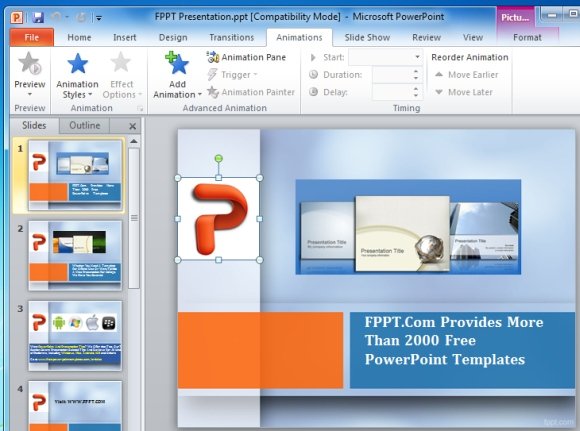
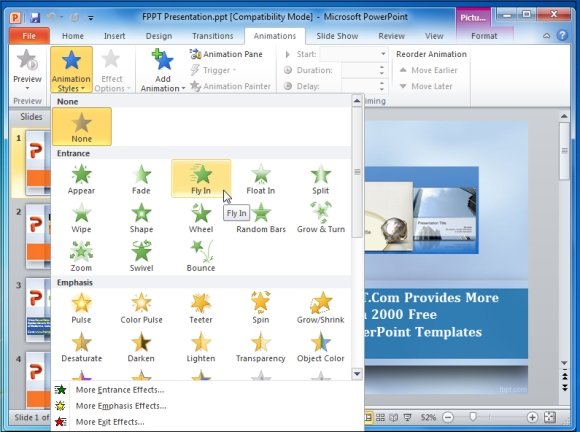
Step 2: Select an Animation to apply to it. You can also apply multiple animations to the same object, as well as select which direction the animation effect is displayed from (via Effect Options).
Step 3: Preview your animation or play it in Slide Show mode.
How To Add Transition Effects in PowerPoint
In PowerPoint 2007, 2010 and 2013 there are many already defined animated effects that you can use from within the Animations or Transitions tab. For example, you may choose to use cool animations for PowerPoint like Cover effects, Blinds effect, Shape Diamond effect, Wheel effect, etc.
Usually, users start with a blank PowerPoint presentation file or a ready-made template with no effects. When you start building your slides, you can add new effects from the Transitions tab. When the presentation is played in slide show mode, your audience will see the applied transition between the slides.
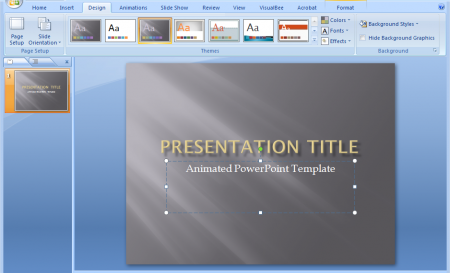
You can also add effects (Animation Styles) via the Animations tab.
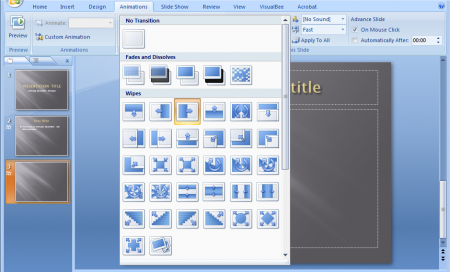
If you have multiple slides you can choose the effects individually for each slide or if you want to apply the same animation/transition effect to your entire PowerPoint presentation, you can also do that. Under Transitions tab in PowerPoint, there are more than 30 transitions that you can use to animate your PowerPoint slides.
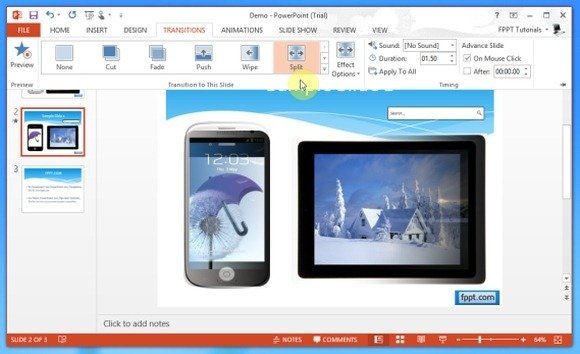
It is worth mentioning here that each Transition has its own unique value and using the right mix of transitions is the key to a successful presentation. You can find out about the utility of PowerPoint transitions from our posts about PowerPoint Transition Effects.
Easy Method Of Creating Custom Animations in PowerPoint
If you don’t want to animate the background but instead you want to use custom animation, then you can achieve that by using your own animated clipart or original clipart from PowerPoint with custom animated effects. In the following example we created a new slide and added a Clipart image. Then we choose Custom Animation from the Animations menu tab. Once there, you can add new effects like transitions, entrances, exit animation, shadow, special effects and more.
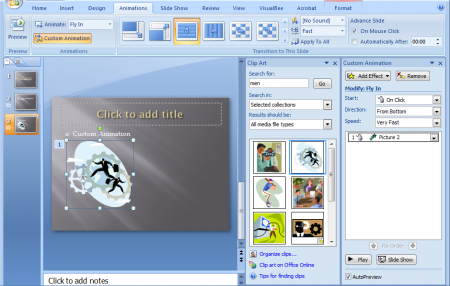
This functionality makes it possible to create attractive PowerPoint presentations by combining not only images, media or text, but also animated effects in PowerPoint.
Use Animated PowerPoint Templates To Make Life Easy!
Another fine method of adding animations to PowerPoint is to use animated templates that are pre-rendered with video animations. These templates come with appropriate place holders which mix with your added text, images and videos to provide you with a professional looking and eye-catching animated presentation. For more details, see our guides regarding the use of Animated PowerPoint Templates and Video Backgrounds.
If you enjoyed the above guide, then do check out our collection of more than 3000 free PowerPoint templates that can help you make professional looking presentations on any topic imaginable.
thank’s a lot
panu gamaWA ng power point?
Fabulous templates. i got it. thanks to you Sir/Mam.
tribal monterrey
“Appreciate you sharing, great post.Really thank you! Really Cool.”
I already knew this stuff
Very good templates here.
We love it.